DICOM on every screen you own

Read the study.
Not the software.

MedView opens a study, finds it on your PACS, measures it and marks it up — on the phone in your pocket and the workstation on the desk, with the same drawings on both.

Free to download · no account · a demo PACS server is built in

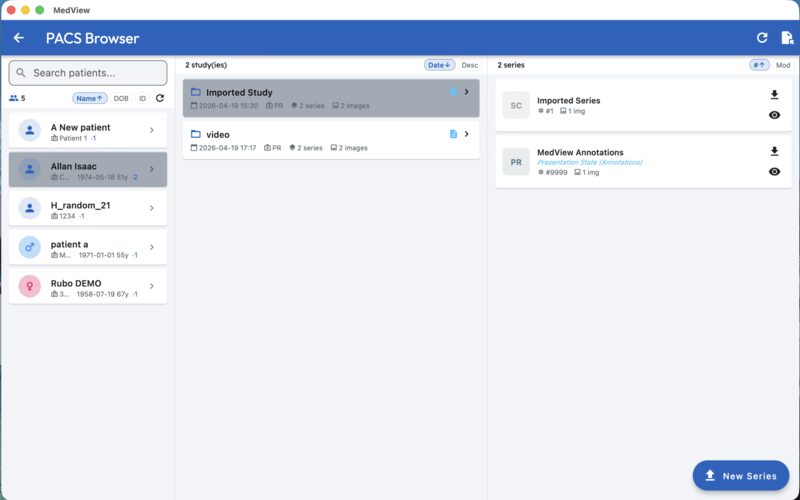
The MedView PACS browser: patients on the left, studies and series on the right
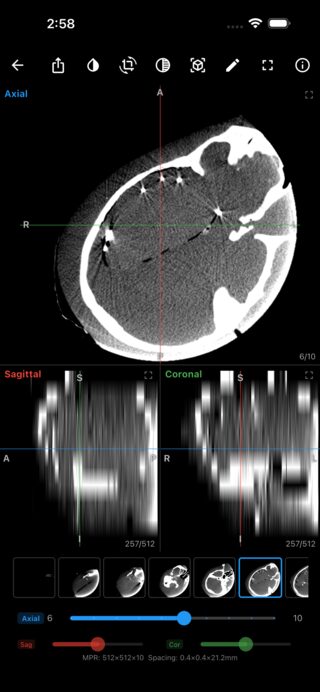
Multiplanar reconstruction of a head CT on a phone Version 1.0.4

What’s new

1.0.4 Available now

Released 28 October 2026

Windows 1.0.4 Available now Linux 1.0.2 Available now iOS 1.0.4 In review Android 1.0.4 In review
  • Annotations drawn in Camivex arrive with the image and stay editable — and upload to PACS as GSPS like any other.
  • Sending to MedView from Camivex no longer asks for a licence when the demo server is the only one set up.
  • A photo a phone stored on its side is turned upright before it becomes a DICOM instance.

Store builds appear here as soon as they are approved. On Windows and Linux the app offers the update itself, from this same release list.

The everyday loop

Open it. Find it.
Measure it. Send it.

MedView is built around the four things a study actually needs, in the order they happen — and the same four work whether the study is a folder on disk, a series pulled from PACS, or a picture that arrived from a camera.

  1. 01

    Open a study

    Folders, single files, multi-frame series. Window/level presets, zoom, pan, scroll and cine, on a phone or a workstation.

  2. 02

    Query your PACS

    Several servers side by side, each with its own AE titles and TLS. Find a patient, pull a series, store it back.

  3. 03

    Measure and mark

    Ruler, angle, circle, ROI and text. Marks resize from their corners, move as a group, and follow a zoom exactly.

  4. 04

    Send it back

    Save the annotations to PACS as GSPS, or export the picture. A drawing made elsewhere arrives editable.

Capabilities

What is actually in it

Nothing is listed here that the shipped build does not do. If a server or a study will not open, the app says why — that is a feature too.

DICOM viewing

Everything needed to read a study without a workstation licence.

  • Window & level with presets, invert, zoom, pan and scroll
  • Series and instance thumbnails, cine playback, multi-frame instances
  • MPR — axial, sagittal, coronal — and maximum-intensity projection
  • Pixel spacing and orientation honoured, so a measurement means something

PACS connectivity

Your servers, your AE titles, your network.

  • C-FIND, C-GET, C-MOVE and C-STORE, with per-server TLS
  • Several servers remembered, with one chosen as active
  • Annotations returned as GSPS, so other viewers see them too
  • A built-in demo server for a first look, with no account and no configuration

Measurements & annotations

Drawn the way a drawing tool works, not a paint program.

  • Ruler, angle, circle, ROI and free text, in the colour you pick
  • Pick a mark up, pull a corner to resize, drag its body to move
  • Box-select several, move them as one, delete them in one step
  • A magnifier follows the pointer, so a corner lands on the edge you meant

Hand-off from Camivex

What the camera saw, with the drawing on it — still a drawing.

  • Send a capture from Camivex straight into MedView’s upload screen
  • The marks arrive as annotations you can edit, not as burnt pixels
  • Upload to PACS, annotate further, then save it back as GSPS
  • No licence needed when the demo server is the only one configured

Screens

The same study,
three sizes of screen

A phone in one hand and a workstation on the desk are not the same job. MedView lays itself out for the screen it is on — including foldables and tablets, where the controls move off the picture.

MedView home screen on a phone, with recent studies and the server list
HomeRecent studies, and the server you are reading from.
The PACS browser on a phone, listing patients and studies
PACS browserQuery a server by patient, study or series.
A CT slice open in the MedView viewer on a phone
ViewerWindow and level, zoom and scroll, with the study’s own values.
Multiplanar reconstruction showing axial, sagittal and coronal views
MPRThree planes of a volume, moving together.
An annotated CT slice with a measurement and a label
AnnotationsMeasure, mark up, and keep it with the instance.

Download

Every platform,
one app

App Store and Google Play handle their own updates. On Windows and Linux the app checks for a new version itself, from the same release list this page is built from.

iPhone & iPad
iOS 15 or later
Version 1.0.4 In review
Android
Android 9 or later · phones, tablets and foldables
Version 1.0.4 In review
Mac
macOS 12 or later
Version 1.0.4 In review
Windows
Windows 10 or later, 64-bit · no runtime to install
Version 1.0.4 Available now

Prefer to install directly? Windows installer (.exe) — the same signed build.

Linux
64-bit · AppImage, .deb or .rpm
Version 1.0.2 Available now

Also as .deb (Debian, Ubuntu) or .rpm (Fedora, openSUSE).

Free & paid

The viewer is free.
The plumbing is not.

Reading a study on your own device, drawing on it and keeping the drawing costs nothing. What a department needs — sending to servers, exporting, advanced imaging — is a one-time purchase, not a subscription. No account is needed for either.

Free

Always · no account

  • Open and read DICOM from files and folders
  • Window/level, zoom, pan, scroll and cine
  • Measure and annotate, saved with the instance
  • The built-in demo PACS server, for a first look

Before you install

What it needs

MedView keeps everything on the device it is installed on. Nothing is uploaded anywhere unless you point it at a PACS server and press store.

  • iPhone & iPadiOS 15 or later
  • AndroidAndroid 9 or later
  • MacmacOS 12 or later
  • WindowsWindows 10 or later, 64-bit
  • Linux64-bit, AppImage or a package
  • PACSDICOM C-FIND / C-GET / C-MOVE / C-STORE
MedView is not a certified medical device. It is not intended for clinical diagnosis or treatment planning, and should not be used where regulatory-cleared diagnostic software is required. Check that a study you need was actually retrieved and stored — the app reports what the server said, and nothing more.